Glyph Pulse
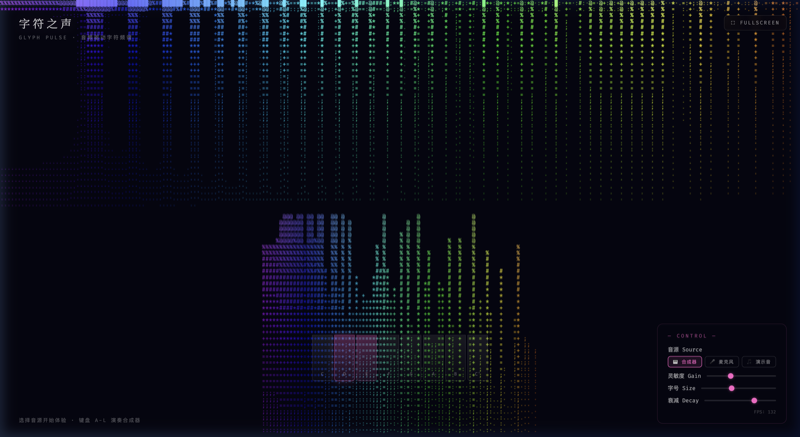
Music gets a body made of characters. FFT spectrum is translated into character columns growing from the bottom - low frequencies are red '█', highs are blue '·'. Built-in synth or your voice can make this glyph wall dance.
About This Work
Glyph Pulse is the finale of Glyph World - a character matrix driven by sound. Web Audio API's AnalyserNode performs real-time 256-point FFT spectrum analysis, mapping 128 frequency bands to evenly spaced character columns. Each column grows from bottom to top, height determined by amplitude, with character density graduating from '█' at the base to '·' at the peak. Frequency-to-hue mapping colors low frequencies warm red, mid-range yellow-green, and high frequencies cool blue. A built-in synthesizer auto-plays C-Am-F-G chord progressions with melody notes. Microphone mode captures live audio. Smooth decay algorithms ensure graceful column descent; beat detection triggers full-screen pulse flashes on strong bass hits.
Features
- 256-point FFT real-time spectrum analysis
- 128 frequency bands → character column mapping (amplitude=height, frequency=hue)
- Built-in synthesizer auto-play (C-Am-F-G chords + melody)
- Microphone real-time audio input
- Smooth decay algorithm + beat pulse detection
- Gain/font size/decay rate adjustable
How to Use
- Click ▶ PLAY to start built-in synthesizer
- Or switch to microphone mode, speak or play music
- Use bottom-right panel to adjust gain and decay rate
- Adjust font size to change character matrix density
- Click fullscreen for immersive mode